

Quick answer
What you need to know
Prime Day listing preparation is a two-week operational sprint — brands that win Prime Day in July do most of the work in June, not the week before.
Why the Prep Window Is 2–3 Weeks Out, Not Days Before
Listing Quality Checklist
Inventory Positioning
Premium reader tools
Turn insight into action
The brief, before you dive in
A practical snapshot of what this guide will help you understand and apply.
Key takeaways
- Why the Prep Window Is 2–3 Weeks Out, Not Days Before: Amazon's search index does not update in real time.
- Listing Quality Checklist: Before you spend a rupee on ads, your listing needs to be in the best possible shape.
- Inventory Positioning: The quickest way to calculate your Prime Day inventory need is: average daily unit velocity × event multiplier × event duration.
- Pricing: The 30-Day Price History Rule: Amazon's "Was / Now" deal badge — the one that shows a crossed-out price next to your deal price — is only displayed when your deal price represents a…
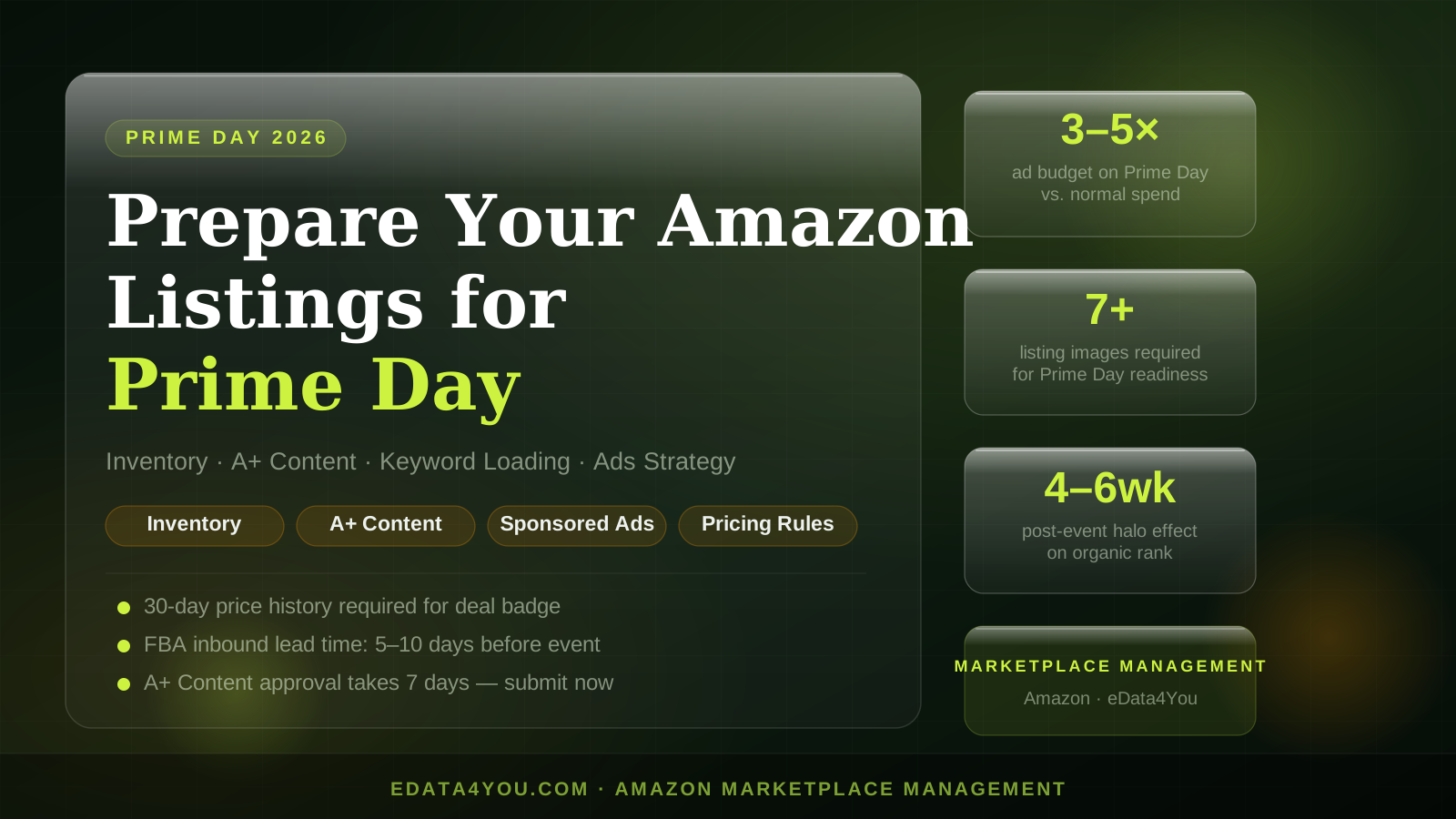
Prime Day is not a 48-hour event — it's a 4-week campaign with a 2-day spike in the middle. Brands that treat it as a last-minute promotion scramble end up with suppressed listings, out-of-stock FBA inventory, and ads that never finished their learning period. The groundwork happens now, in late June, so the algorithms and the fulfillment network are both ready when traffic surges.
Need help applying this? Explore our Amazon Account Management.
Why the Prep Window Is 2–3 Weeks Out, Not Days Before
Amazon's search index does not update in real time. When you add keywords to your backend search terms or rewrite a title, full indexation typically takes 5–14 days. If you make changes on July 13, those changes do not meaningfully affect your Prime Day rank on July 15–16.
The same logic applies to advertising. Sponsored Products campaigns operate on a machine-learning bidding model — it takes 7–14 days of impression and click data for Amazon's algorithm to understand which placements and audiences convert for your ASINs. Launching a campaign the day before Prime Day is essentially running it blind.
FBA inbound lead times add another constraint. Inventory shipped to Amazon fulfillment centers today takes 5–10 business days to receive and check in, and that window can stretch during peak periods. Units that haven't completed receiving cannot be sold. If your velocity model shows you need 500 units and you currently have 200 checked in, the window to fix that is closing fast.
Listing Quality Checklist
Before you spend a rupee on ads, your listing needs to be in the best possible shape. Amazon's algorithm uses listing completeness as a quality signal, and poor listings convert poorly no matter how much traffic you buy.
Title: Front-load your primary keyword. The title should read naturally but contain your brand name, key feature, model or variant, and size or quantity. Amazon allows up to 200 characters on most categories — use them.
Bullet points: You need all five filled, and each should lead with a benefit written in capital letters followed by the supporting detail. Do not waste a bullet on generic filler like "GREAT QUALITY." Specifics convert — dimensions, certifications, compatibility information.
Images: The minimum for competitive listings is 7 images. The main image must be on a pure white background. The remaining six should include a lifestyle shot showing the product in use, an infographic highlighting key features, a scale image showing size relative to a common object, a back-of-pack or ingredient/spec shot, and ideally a video. Amazon has confirmed that listings with video see higher conversion rates, particularly on mobile.
A+ Content: If your A+ content is not yet live, submit it today. Amazon's approval queue runs approximately 7 days. If you have not yet had a Brand Story approved, that is a prerequisite for Premium A+, which consistently outperforms standard A+ on conversion — get the Brand Story in first.
Backend search terms: Pull your Search Term Report for the last 30 days and cross-reference it against what's currently in your backend. High-converting terms that appear in the report but not in your backend are leaving rank signal on the table. The backend field is 250 bytes — fill it with synonyms, alternate spellings, and regional terms your title and bullets already contain, so you're not duplicating them.
Inventory Positioning
The quickest way to calculate your Prime Day inventory need is: average daily unit velocity × event multiplier × event duration. For most mid-tier products, the event multiplier is 3–8× depending on category and deal depth. A product selling 20 units per day on normal days might sell 100–150 on each Prime Day peak day. Model conservatively at 4× and aggressively at 7×, then position between those numbers.
Watch your stranded inventory report in Seller Central. Stranded units sit in fulfillment centers but are not available for sale because of a listing error or pricing alert. They burn your storage allocation and they will not be sold during Prime Day. Run the Stranded Inventory report now and fix every root cause — whether it's a suppressed listing, a pricing error, or a missing required attribute.
Also check your IPI (Inventory Performance Index) score. A score below 400 restricts your storage limits. If your score is borderline, resolving excess inventory through markdowns or removal orders before Prime Day frees up capacity for your winning SKUs.
Turn these recommendations into a working process with Amazon Account Management.
Pricing: The 30-Day Price History Rule
Amazon's "Was / Now" deal badge — the one that shows a crossed-out price next to your deal price — is only displayed when your deal price represents a genuine discount from your price history over the last 30 days. If you've been running your product at ₹999 and you want the badge to show at ₹699, Amazon needs to see that ₹999 price established consistently in the 30 days prior.
Do not discount aggressively in the weeks before Prime Day. Hold your regular price so the deal looks like a deal. If you've been running flash sales throughout June, your effective price history may disqualify you from the badge, which meaningfully reduces click-through rates on deal listings.
For Lightning Deals specifically, eligibility requires at least a 15% discount off the pre-sale price, and deal submission typically closes weeks in advance.
Sponsored Ads Strategy for Prime Day
Start tightening your keyword strategy now. Identify your top 10–20 converting search terms from the last 30 days, confirm they're in your campaign targeting, and raise bids on those terms by 20–30% starting 5 days before the event. This pulls you into the ad auction at higher positions before Prime Day traffic spikes, so the algorithm already has you placed competitively when the volume arrives.
For Prime Day itself, plan to increase campaign budgets 3–5×. Budgets cap out fast when traffic multiplies — a campaign that normally runs ₹2,000/day will exhaust that in a few hours on Prime Day. Set budget rules or check daily to avoid going dark mid-event.
Use Sponsored Display campaigns to retarget shoppers who viewed your product but didn't purchase. These campaigns can continue running for the 2–3 weeks after Prime Day, capturing the demand tail when your organic rank is elevated.
On ACoS vs TACoS: during Prime Day, your ACoS will likely spike because you're buying traffic aggressively. That's acceptable if your TACoS (total advertising cost of sale, which includes organic revenue) remains in range. Judge ad performance against TACoS during the event, not ACoS in isolation.
Account Health Before the Event
Amazon restricts Prime Day deal eligibility for ASINs with active violations, suppressed listings, or account-level health warnings. Go to Account Health in Seller Central now and resolve anything red or yellow. Check:
- Policy compliance (IP complaints, authenticity issues)
- Suppressed listings (usually a missing required attribute or image)
- Stranded inventory (already covered above)
- Any A-to-Z Guarantee claims that are unresolved
A clean account health dashboard is table stakes for Prime Day participation.
The Post-Prime Day Halo Effect
Prime Day is not just a two-day revenue event. The sales velocity you generate during Prime Day sends a strong organic rank signal that Amazon's algorithm carries forward for 4–6 weeks. Sellers who aggressively push units during Prime Day often find themselves ranked for competitive keywords they weren't ranking for before.
Do not cut your ad spend sharply the week after Prime Day. Maintain elevated budgets for at least 7–10 days post-event to sustain the rank gains you've earned. Pulling back too fast wastes the momentum you paid to build.
If your team doesn't have the bandwidth to run this across a full catalog before Prime Day, that's exactly the kind of work our catalog and marketplace team handles. eData4You's Amazon product listing services cover everything from listing optimization and A+ content to backend keyword strategy and account health monitoring — so your ASINs are Prime Day ready before the window closes.
Let's build something great together
A dedicated team of ecommerce, design, and data specialists - ready to scale your business across every marketplace.
Recent Posts
Latest on Social
Grow your sales on Amazon, Walmart & more
Our marketplace specialists handle listings, SEO, catalog & ads - end to end.
Talk to an Expert
Amit Sharma
Founder & IT Head | Project Management & IT Strategy Expert

Leave a Comment